
WHAT DREEZE DOES
Cloud backup has become very good at saving data and much less good at recovery, which is what’s truly essential for getting your business back up and running again. Snapshots and native backup services often protect resources one at a time. But enterprises don’t run on a resource or two. They run applications, and an application is data plus the infrastructure, configuration, identity, keys, and connections that make the data useful.
At enterprise scale in the cloud, apps these days often involve hundreds or even thousands of resources. Without all the interdependent parts of an app, a restore can succeed completely and yet leave you with a database that nothing can reach, a function with no role to assume, and a cluster whose secrets are gone. Your team then rebuilds the rest from memory and out-of-date runbooks, while the business waits.
Dreeze closes that gap. It reads your AWS accounts as they are in reality (not on paper or in drifting IaC definitions), works out which resources make up each application and how they depend on each other, then backs up everything each application needs into an immutable vault in your own account. It generates an automated recovery plan in dependency order, and lets you run that plan as a non-disruptive test into an isolated account before you ever need it. Dreeze calls this Application Revival, and it’s purpose-built for teams who need to fully recover apps, not simply restore data.
Where teams use it
- Cyber recovery after an account is compromised. Rebuild the application in a clean, isolated account outside the blast radius, with its keys, secrets, and identity included, and scan it with your own security tools before you reconnect anything. Dreeze also flags backups that show signs of destructive changes so you can weigh using a recovery point before you rely on it.
- Compliance and SLA evidence. Prove to internal stakeholders and external auditors that backups ran, that recovery was tested against production data, and who did what. Do all that without scheduling a production outage to get the evidence and do it at a test cost low enough to run them often.
- Recovery after a bad change. When a misconfiguration or a bad deployment breaks an application, choose an earlier recovery point and bring the application back as it was, rather than reconstructing the change manually.
The rest of this document covers how each of those works within AWS.
HOW DREEZE WORKS
Dreeze has four stages. It learns what you have and how it fits together, protects it, generates the plan to bring it back, and proves the plan runs.

-
Know
Autonomous application mapping
-
Protect
Backing up the whole application
-
Orchestrate
The recovery plan
-
Validate
Proven recoverability
2.1 Know: autonomous application mapping
Discovery
Dreeze scans your AWS accounts through a read-only CloudFormation role. For every resource type in every region, it asks the cloud what exists and saves the answer as it comes back: the resource identifier, its type, its region and account, its name, and its full configuration. Nothing is interpreted at this stage.
Discovery runs across accounts, regions, and Availability Zones. It repeats every 24 hours automatically and you can start a manual re-scan at any time. When a resource that was present disappears from a complete listing, Dreeze marks it as deleted rather than removing it from the app definition, so the history of the environment survives.
For Elastic Kubernetes Service (EKS), Dreeze connects to each cluster directly and systematically scans namespaces, tags, and Helm charts in order to catalog the services and resources since in-cluster objects do not natively show up in an AWS inventory. The modeling hierarchy is cluster, then namespace, then Helm release.
Classification
As Dreeze discovers resources, an AI-assisted classification step reads its type, name, tags, and settings and answers a fixed set of questions: what kind of data it holds and how sensitive that data is (e.g. financial data, intellectual property, or PII), whether it looks like production or test, and what role it plays in an application. The model answers in a fixed Dreeze-specific format rather than free text.
Classification labels are both informative and operative: they can simplify backups later on by automatically crafting a plan around, for example, anything holding sensitive data.
Dependencies
Dependencies are read directly from configuration, not inferred. For every resource type, Dreeze’s dependencies engine knows where in that type’s settings the references to other resources live and what each reference means. A function names the role it runs as. A database names a subnet group, which names subnets, which name the VPC. A volume names the key it is encrypted with. Run through the configuration and you get typed connections, and you get the same answer every time.
There are more than 250 kinds of supported connections. About two thirds are required, meaning the resource cannot come back without the other one, and the rest are optional attachments or scope relationships. Every connection carries its type and a plain-language reason, so you can see why Dreeze believes one thing needs another.
Dreeze particularly focuses on mapping often-overlooked resources beyond obvious candidates such as an EC2 instance. For example, resources such as the KMS key, the secret, the IAM role, the queue: the pieces that are sometimes missed on an architecture diagram because nobody thinks of them as part of the application until the application will not fully run without them.
Dependencies are customizable: if Dreeze missed one, or mapped one incorrectly, it can be fine-tuned as needed. Customized app definitions and dependency mappings are never overridden automatically by the platform once they’ve been edited by users.
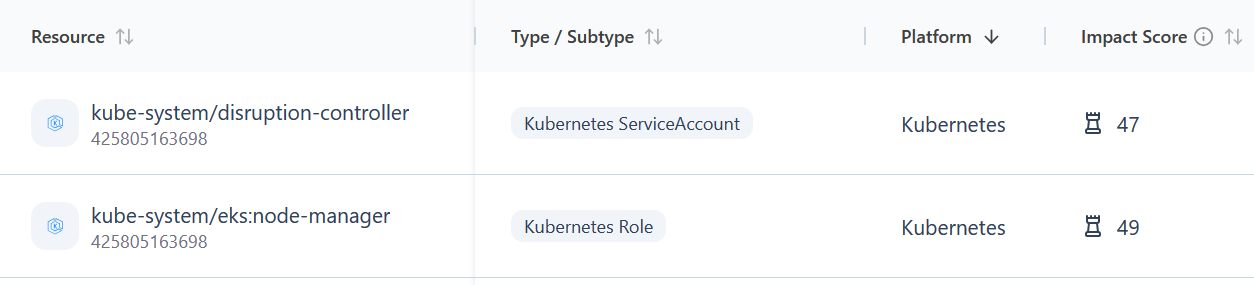
Lastly, all dependencies are given an impact score: how critical Dreeze believes it is to the functioning of an application. A higher score is a resource used by multiple others or likely to support significant app functionality, such as a database.
What counts as an application
In Dreeze, an application is a set of root resources plus everything you reach by following required connections from them. Roots are the key resources, such as compute or databases, that do the work. Supporting resources such as roles, networks, keys, and log groups are never roots; they are reached from roots. Container relationships are deliberately not followed, which is what stops a shared VPC from pulling six unrelated applications into one.
Roots come from five sources, and they complement and coexist rather than compete:
- Your tags. Resources that share an application tag become an application. A tag that covers a quarter of the account is treated as a broad bucket, and Dreeze looks for the real applications inside it. Note tags are an input, but not the only input, and accurate or comprehensive tags are not required for Dreeze to map your applications.
- Infrastructure-as-code (IaC) definitions. Dreeze can read the Terraform you already have, starting with your state files where they live, to help inform its application mappings. You can also connect GitHub so Dreeze reads the Terraform in the repositories you choose. As with tags, these are optional aids to assist Dreeze and not required inputs.
- Kubernetes namespaces and Helm charts. Each namespace becomes an application, plus one per cluster spanning all its namespaces.
- AI-assisted proposal. Where nothing was declared, a Dreeze agent reads names, tags, and connections and proposes which compute resources belong together and what to call the group. Each proposal carries a confidence level and a stated reason.
- You. Define an application by choosing its roots, or edit one Dreeze proposed by adding a resource, removing one, or drawing a connection Dreeze cannot see.
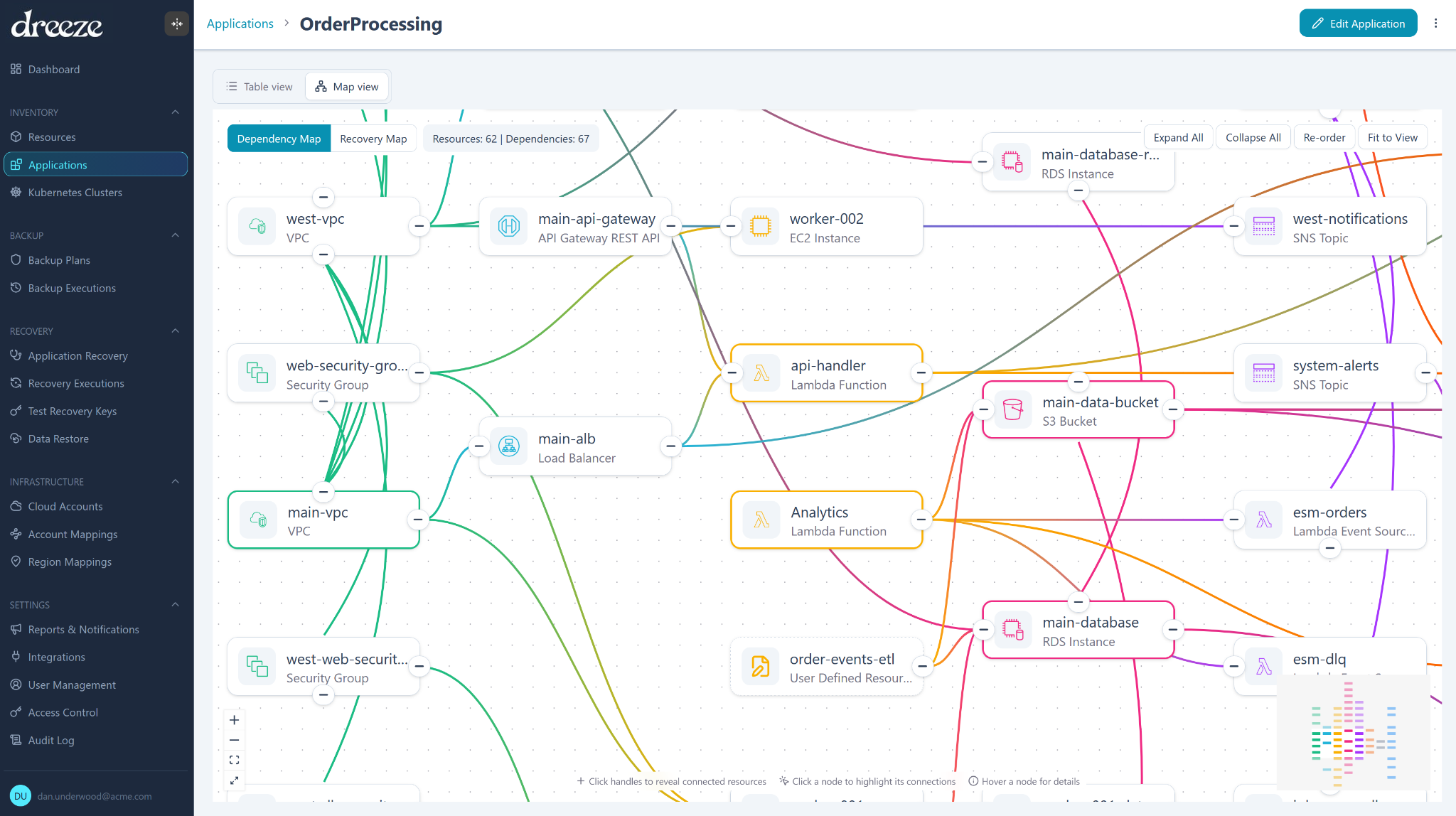
Membership is always the walk along the dependency graph. Dreeze’s AI agent proposes where an application starts; it never adds a connection and never decides membership. A resource can belong to more than one application, which is usually correct rather than a mistake. The application map shows where applications overlap, so you can see when two of them depend on the same database, key, or role. Section 2.3 covers recovering those applications together.
Dreeze also compiles a confidence score for each resource; i.e. how sure Dreeze is that a given resource is, in fact, part of that application. The score is explainable: click it and you see the factors that produced it, so it drives a decision about what to protect next. An application you have defined or corrected yourself is never rewritten by a later pass.
Cloud-managed services you do not own appear in the map as dependencies so the picture is complete, even where Dreeze does not recreate them.
Application naming
Dreeze infers a name for each application based on multiple inputs; whatever is chosen initially is always editable. Key inputs include namespaces, tags (if present), or picked up from resource naming patterns. For example, a group of resources without tags but with names prefixed by “payment-processing” all likely belong to the same payments app.
Each application shows how it was created, so you can tell a name you declared from one Dreeze inferred. Discovery doesn’t create two applications with the same or nearly the same name, and when you create an application yourself, Dreeze won’t let you reuse an existing name.
A name you set stays set. Rename an application and later scans leave your name alone. That matters beyond the Applications list, since the name is what your team sees in Recovery Readiness, recovery reports and alerts. When an incident hits, the name on the screen should be the one your team already uses.
Recovery risk
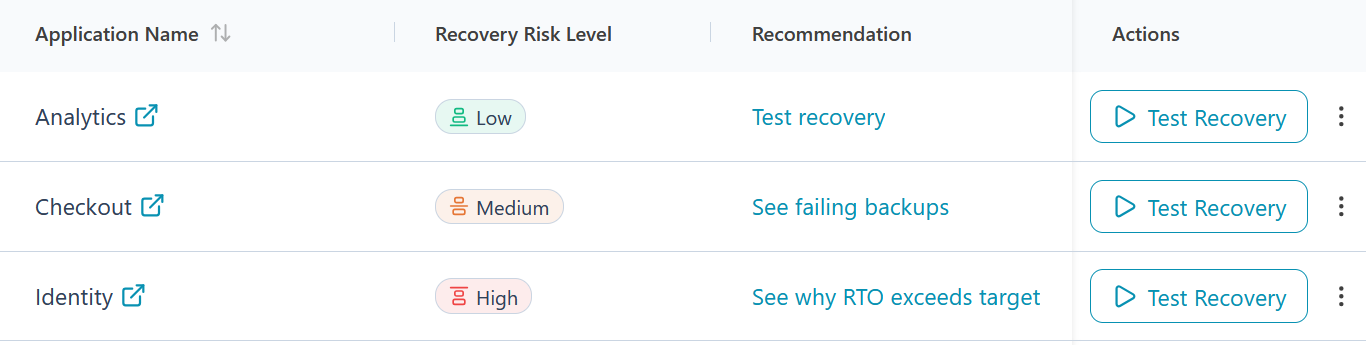
Once applications exist, Dreeze scores each one for recovery risk, and the scoring is deliberately unforgiving. If any member of an application is unprotected, the application scores 100. Protection is binary, and partial coverage is not partial credit. If the most recent test recovery failed, the score lands between 80 and 99, weighted by how much the application matters.
Only when everything is protected and the last test passed does the score turn to the softer questions: how stale that test has become, and how far the application sits from its RPO and RTO targets. Those are blended rather than averaged, so one bad dimension cannot be smoothed away by three good ones. Where an input is missing, Dreeze returns no score and names the missing input rather than defaulting to zero.
2.2 Protect: backing up the whole application
Backup plans
A backup plan says what to protect, how often, where to keep it, and for how long. Plans are configurable based on any combination of the following:
- Resource
- Application
- Helm release
- Tags
- Data classification (e.g. PII)
- Account-wide
Assignment rules mean an application or resource added tomorrow is automatically protected without further manual work.
When two plans could apply to a resource or application, a user-defined plan priority setting decides which one takes precedence.
Before you commit a plan, Dreeze previews exactly which resources will be covered, what the plan would do, and how much in cloud consumption it’s expected to cost. Dreeze doesn’t use AWS Cost Explorer. The estimate uses standard AWS pricing rather than your negotiated rates, so treat it as a planning figure.
By default, Dreeze compresses and deduplicates to improve performance and reduce storage costs.
What’s in the vault
Every backup has two parts. The shape of the application is stored as Terraform, generated from the resources as they were actually running, with hardcoded values pulled out into variables. The data is stored as real copies alongside it: volume snapshots, table data, object copies, secret values, and container images, all captured at the same recovery point or as close to it as possible.
The stored Terraform is readable, so you can see what a recovery will build before you run it. Recovery is a terraform apply from the vault, using the provider version stored with the backup, so an old backup still applies cleanly. You can also open any protected resource in the vault and see it as it was at any recovery point.
IaC describes what the environment is meant to be. A Dreeze backup records what it actually was at that moment, drift included, with the data alongside it.
What gets captured
Dreeze backs up data and configuration together so a restore produces a working environment rather than bare data. The configuration layer is the part most backup products skip:
| EC2 instances with all attached EBS volumes, plus the metadata needed to reconstruct them, and Auto Scaling groups | RDS and Aurora through native snapshots for all engines, and Dreeze Snapshot for the granular PostgreSQL path |
| DynamoDB tables | Lambda function code, layers, aliases, URLs, and event source mappings |
| EKS control plane, node groups, add-ons, identity provider configuration, and live manifests for 50+ Kubernetes object types | ECS clusters, services, and task definitions on Fargate or EC2, with capacity providers, auto scaling policies and their alarms, and Cloud Map service discovery |
| VPCs, subnets, route tables, gateways, endpoints, network ACLs, and security groups | IAM roles, policies, users, groups, instance profiles, and OIDC providers |
| KMS keys and aliases, Secrets Manager secret values under envelope encryption, SSM parameter values, and Kubernetes secrets | SNS topics and SQS queues |
| S3 bucket configuration |
For a full list of supported resources, please contact Dreeze directly.
Schedules and recovery point objectives
Plans run daily, weekly, or monthly, on a custom cron expression you supply, or on demand. Dreeze measures the largest gap between consecutive runs and checks it against the recovery point objective (RPO) you have stated for the application, so the schedule is evaluated against your target rather than left for you to reason about.
Retention, immutability, and encryption
Each rule sets how long its copies are kept, and copies are removed when that period ends.
Every copy is written into a dedicated vault account in your own estate and locked on write in your choice of compliance mode or governance mode. In compliance mode, a copy cannot be changed or deleted for the duration of its guarantee window, even by your own administrators or Dreeze technical support. A change of mode is recorded in the audit log, and if a copy can’t be locked for its full window, the backup fails rather than leave an unlocked copy behind.
The lock is renewed before it lapses. EBS snapshots additionally carry the native AWS snapshot lock. The primary use case is for cyber recovery and supporting a 3-2-1-1 backup strategy: the vault is logically air-gapped from production, in your ownership, with immutable copies that are unreachable and untouchable by attackers or rogue AI agents.
Everything is encrypted at rest under KMS keys in your account. Keys never leave your account, and the write path fails closed, so an unencrypted copy is never written.
After the first full backup, Dreeze uses incrementals (if the resource supports it) to only copy what changed, which is the main lever on storage cost over time.
Anomaly detection
A backup can complete successfully and still hold damaged data. After each backup, Dreeze compares what it captured against that resource’s own history. It looks for signs of destructive change: data deleted in bulk, tables or objects that disappeared, data draining away across several backups, or most of a dataset rewritten at once. When it finds one, it flags the recovery point and shows what changed and where.
Flags appear wherever you choose a recovery point, in test recoveries, live recoveries, and granular restores. Pick a flagged point and Dreeze warns you before the recovery runs. From a finding, you can open the affected table directly to inspect or restore it. Dreeze tells you what changed and by how much. Whether the change was an attack, a mistake, or a planned migration is a call your team makes with that evidence in hand.
Copies in another region
A plan can keep a copy in a second region so there is something to recover from when a region is gone. What replicates varies by resource type, and your Dreeze contact can confirm the position for the specific resources in your estate. Which region a copy lands in is an organization-level setting, so you can repoint it without editing every plan.
2.3 Orchestrate: the recovery plan
Order comes from the graph
Although granular restores are possible, Dreeze recoveries are typically app-centric by design in order to enable full application recovery after a disruption. Dreeze generates the recovery plan from the application’s own dependency graph but with the crucial addition of ordering instead of only dependencies. Networking before the resources that sit in it, keys before the resources encrypted with them, roles before the functions that assume them. Nothing is sequenced manually, so there is no runbook to maintain and none to go stale between the day it was written and the day you need it.
Because every backup stores the application’s connections alongside the copy, a recovery revives the application as it was on that day rather than as it is drawn today. Identifiers change during a recovery, and Dreeze rewrites references so the recovered resources point at the recovered copies rather than at the originals.
Crucially, everything needed to rebuild the application sits in your vault account alongside the data: its configuration as Terraform, its dependency map, and its membership at the time of the backup. A lost or compromised environment doesn’t take your ability to recover with it.
Recovering applications together
Many business systems span more than one application. For example, a payments platform might run separate applications for sending and receiving money, both built on one database. Recover them one at a time and you get two copies of that database, and neither copy matches how the system runs in production.
A “recovery set” in Dreeze handles this. You choose the applications that belong together, plus any individual resources, and save them as one recovery template. Dreeze then tests or recovers the set as a single operation over the combined dependency graph. A resource the applications share is recovered once and connected to every application that uses it. You get one report with an outcome for each application, and one cleanup when a test ends.
Members can come from your live environment or from the vault. That means a set can still be recovered when the source resources no longer exist, which is often the situation after a serious incident.
Choosing the recovery point
You pick the date and time to recover to. Each resource comes back from its most recent recovery point at or before that time, and Dreeze shows which point each resource will use before anything is built. Applications in a recovery set share one point in time, and you can see how far apart the recovery points of shared data resources are, so nothing gets mixed without your knowledge.
If Dreeze flagged a recovery point during anomaly detection (see 2.2), the flag appears here, next to the resource it applies to.
Choosing the target
You choose where an application comes back: which account, and which region. Region mappings let you decide in advance that applications in one region recover into another, so the decision is made before the incident rather than during it.
Recovery into a separate, clean account is the recommended pattern for cyber recovery. Dreeze provides the isolated environment; your own security tools can scan what lands there before you reconnect it.
Working alongside your IaC
If you manage your environment with Terraform or CloudFormation, a recovery doesn’t touch your state. Dreeze runs each recovery from its own working directory with no remote backend and no saved state, so it never reads or writes your state files. Recovered resources are new resources, typically in a separate recovery account, and your IaC won’t manage them until you import them. The post-recovery report lists what came back, so your team can decide what to bring under IaC control.
Custom steps
Recovery templates let you add your own steps into the generated plan, alongside a soft ordering mechanism for preferences that are not hard dependencies. A step can run a script, call something outside AWS, or pause and wait for a person or an external system and then be marked complete through the public API.
That last case matters for some enterprise cloud estates. Dreeze recovers cloud-native resources. A third-party identity provider or an on-premises system is not something Dreeze brings back, but it can be an explicit, sequenced, auditable step in the plan rather than a thing somebody remembers at the worst moment.
Reachability
A recovered application that nothing can reach is not recovered. Dreeze recreates load balancers and re-issues certificates, then verifies that the recovered endpoint actually responds rather than assuming it does.
DNS is handled deliberately. Dreeze never holds DNS or registrar credentials and never performs the live switch. Instead it hands you the exact records to create, which also works when another team or an external provider owns DNS. The cutover stays a human-in-the-loop decision.
After a recovery, Dreeze reports what came back and what still needs your attention; e.g. cross-account trust and CI/CD pipelines.
Cleanup and tagging
Everything Dreeze creates during a backup, live recovery, or a test recovery is tagged, which keeps recovered resources legible to your logging, monitoring, and FinOps cost tooling. You can also choose up to five of your own tag keys for Dreeze to carry onto vault copies, and a recovery puts back the tags your resources had at backup time. When a test finishes, Dreeze automatically removes what it created and leaves everything else alone; optionally, you can disable auto-cleanup and perform manual clean-up if preferred.
2.4 Validate: proven recoverability
Dreeze recovery tests prove recoverability prior to a live, real-life incident. Dreeze runs a test recovery on demand, into an isolated environment, against production data, without touching production.
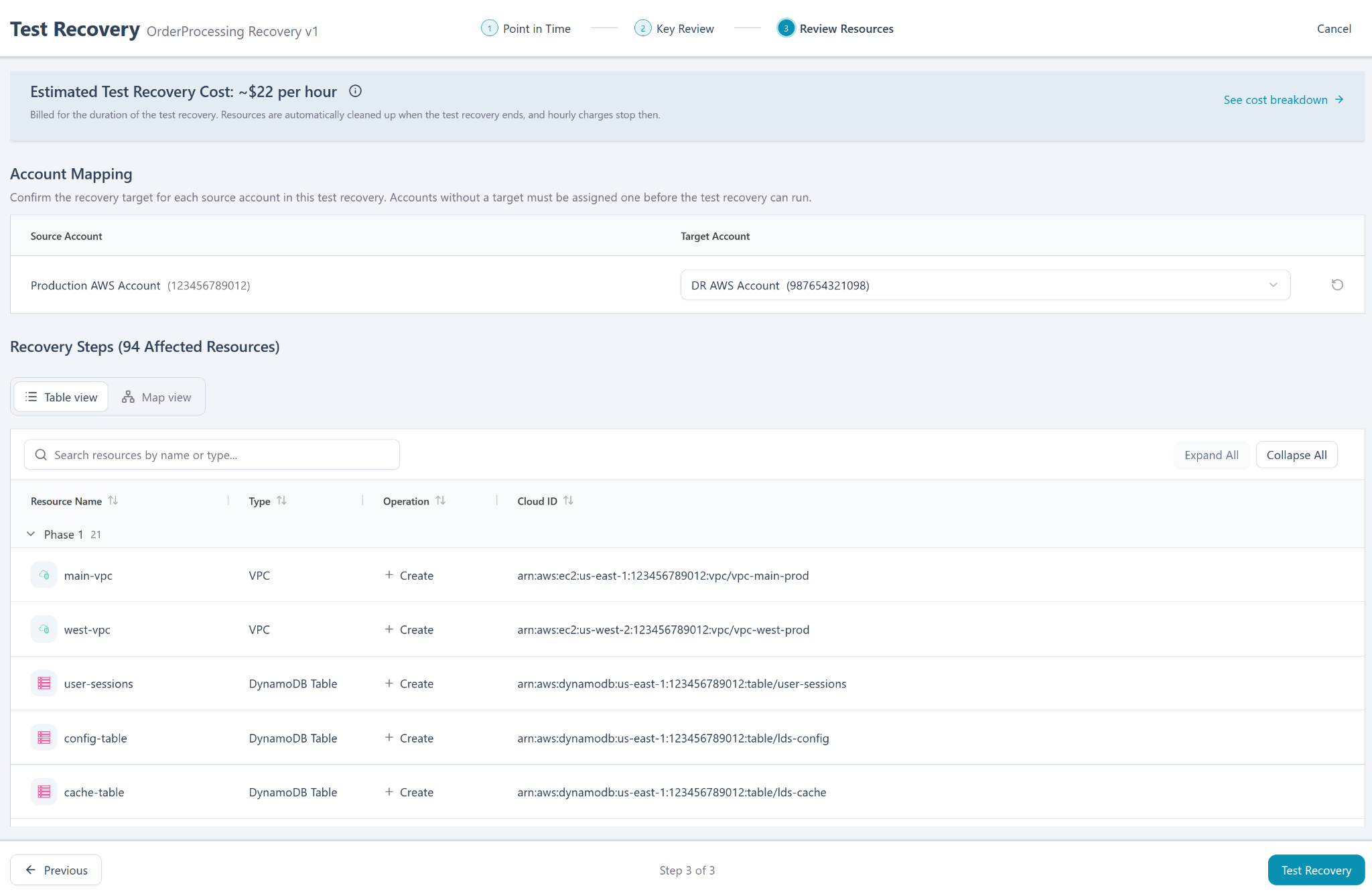
A test runs in three steps.
- Point in time. Choose the recovery point to rebuild from.
- Key review. Decide how each resource’s configuration keys behave during the test.
- Review resources. Confirm what the test will build, then run it.
For a test, you can exclude a region to simulate a regional outage or other loss of access/availability to that region.
Key review
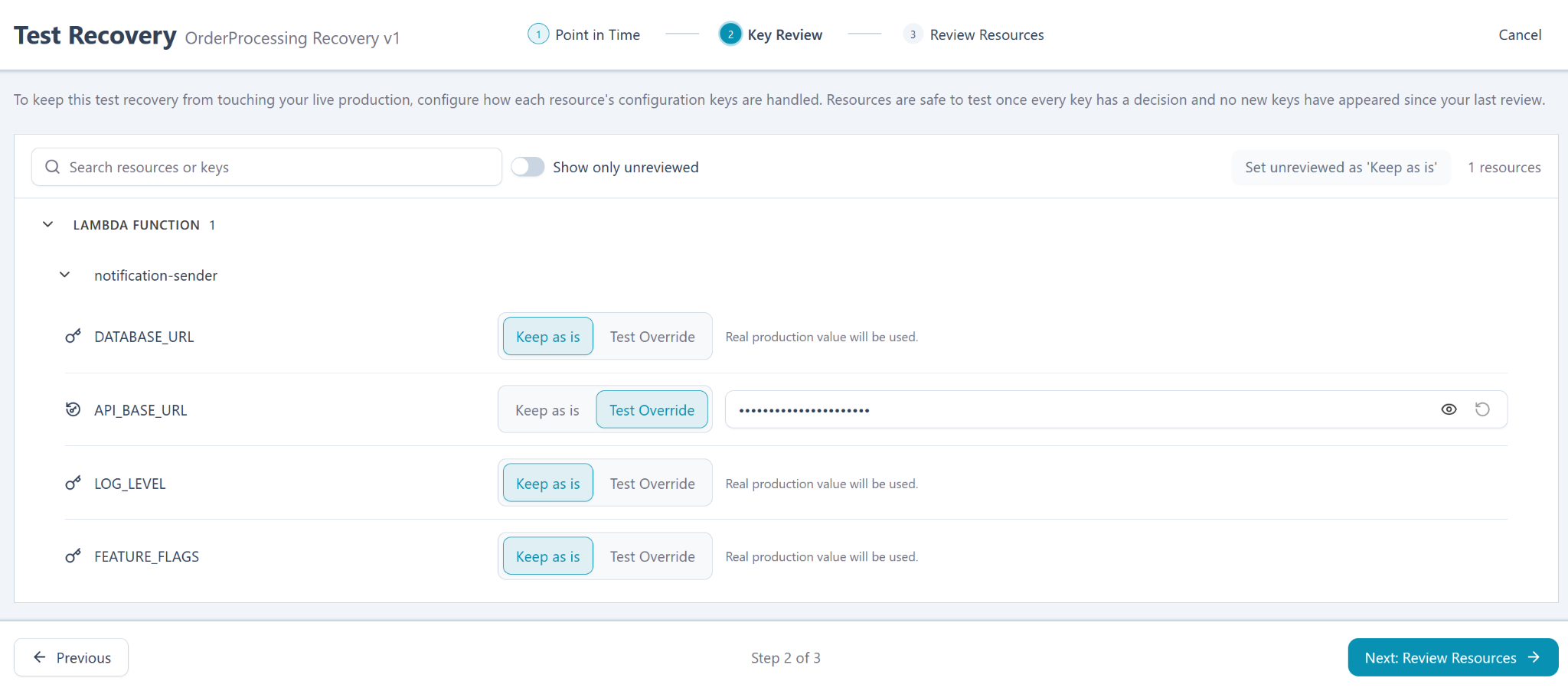
Key review is the step that keeps a test from reaching into production. Dreeze lists every configuration key on every resource in the plan, such as a database URL, an API base URL, or a feature flag, and you decide per key whether to keep the production value or to supply a test override. A resource is only cleared to test once every key has a decision and no new keys have appeared since your last review, so a change in the application surfaces as an unreviewed key rather than as a surprise during the run.
The result is that using a production value during a test is a deliberate choice you made, not something that happened by default.
Testing at reduced scale
A recovery test doesn’t need production capacity to prove an application can come back. Dreeze can run a test on a smaller footprint, called downscaling, with smaller instance sizes, fewer nodes, and fewer copies of stateless services, while still restoring every resource and all of its data.
You set reduced scale on the recovery template. Dreeze’s AI agent proposes what to shrink, explains each proposal, and shows the estimated saving. You can accept a proposal, change it, or keep any resource at full size. Resources that hold data across replicas stay at full size by default.
Reduced scale only ever applies to tests. A live recovery from the same template always runs at full production scale. The test report records that the test ran at reduced scale and lists what was reduced, so anyone reading the evidence knows what was proven. Lower cost and shorter run times make it practical to test on a regular schedule instead of once a quarter.
Custom steps
Before, during, or after the recovery test, Dreeze can trigger custom steps you have defined, which is where your own smoke tests run. Dreeze proves the application came back and the plan executes, and your checks prove the application does what your business needs it to do. Nobody knows what working means for your application better than you do.
Reporting
Each test leaves a record and a report of what ran, in what order, and how it turned out. That record is the evidence for executives, auditors, or anyone else requesting proof of recoverability.
PLATFORM AND SECURITY
3.1 Where Dreeze runs
Dreeze is full SaaS so there is no installer to run, no in-guest agents to manage, and Dreeze operates and maintains the control plane. Everything else lives in your cloud accounts: the roles, the vault that holds the backups, and the resources a recovery creates. Tenants are isolated from one another.
Dreeze uses three of your accounts:
- Source account. The environment being protected. Dreeze holds a read-only role and never writes to it.
- Vault account. Where both backups and backup/recovery plans are stored, in your ownership, with no vendor access.
- Recovery account. An isolated account where recoveries and tests run under a scoped operator role, with automated cleanup afterward.
3.2 What Dreeze can access
Discovery is metadata only: configuration, not contents. Like all backup solutions, the backup jobs themselves cannot be metadata-only: Dreeze reads your data during backup in order to copy it. That read happens inside your own perimeter, and the data lands in your own vault account. Your data does not leave your account. If you connect GitHub, Dreeze has read-only access to the repositories you select and never writes to them.
Full per-role IAM permissions are documented in the security review pack, which your Dreeze contact can provide.
3.3 Security posture
Dreeze is SOC 2 Type II certified. Backups are immutable, stored in a separate account in your estate, and encrypted at rest under KMS keys that stay in your account. Dreeze never holds your keys, and it never holds DNS or registrar credentials.
Users sign in through any SAML 2.0 identity provider (recommended) or are managed directly in Dreeze. Access is controlled by built-in roles: administrator, full operator, backup operator, recovery operator, and viewer. Every action is recorded in an audit log you can browse and export.
3.4 Setup
Onboarding is a CloudFormation role deployed into each account, which your security team can read in full before applying it. The template is identical across accounts apart from the account identifier, and deployment is driven from the command line, so onboarding a large estate is a short script rather than a per-account project. Dreeze does not auto-enroll through AWS Organizations today.
The first scan takes between one and twelve hours depending on how much is in the account. Later scans are much faster, similar to how a first full backup job takes longer than subsequent incremental backups.
3.5 Integrations: API, MCP, and notifications
Notifications and reports can be delivered by email and into ServiceNow and Slack, so protection status arrives where your team already works.
Everything in the product is available through a public API, including triggering backups and running recoveries. Teams can wire protection and recovery into their pipelines, or run Dreeze headlessly without touching the interface.
Dreeze also works headless when using AI assistants such as ChatGPT, Claude, and other MCP-compatible clients, through a hosted MCP server. Users sign in with their own Dreeze account, so every request carries their identity and is limited by their role, and there are no API keys to issue or rotate. Administrators decide whether assistant access is off, read-only, or read-write for the organization, and which members may use it. From there, a team can ask about protection status, look into a failed backup, or start a test recovery in plain language.
COVERAGE
Dreeze discovers and classifies more than 150 resource types across AWS and Kubernetes. The families it backs up and recovers are listed below, and each family covers many individual resource types.
| Family | What Dreeze protects and recovers |
|---|---|
| Compute and storage | EC2 instances with all attached EBS volumes, including multi-volume consistency groups; Auto Scaling groups |
| Databases | RDS and Aurora instances, clusters, and their supporting resources, including PostgreSQL with pgvector, with table-level restore on the granular PostgreSQL path; DynamoDB tables |
| Containers | EKS control plane, node groups, add-ons, container images, and 50+ Kubernetes object types, grouped by cluster, namespace, and Helm release; ECS clusters, services, task definitions, and capacity providers on Fargate or EC2 |
| Serverless | Lambda functions, layers, aliases, URLs, and event source mappings |
| Object storage | S3 buckets, including their configuration and object data |
| Configuration and identity | IAM, KMS, Secrets Manager, SSM parameters, VPC and networking, SNS and SQS, and launch templates, including secret and parameter values |
| Edge | Load balancers (including standalone ALB and NLB), API Gateway APIs with custom domains, CloudFront distributions, WAF web ACLs, and ACM certificates, recreated during recovery, with DNS records handed to you for the cutover |
Everything Dreeze discovers appears in the map whether or not Dreeze backs it up, so an application’s shape is complete even where a dependency is a managed service or a resource type Dreeze does not yet protect. For each application, Dreeze shows which resources are protected and which are not, so you are never guessing what a recovery would miss. Support for new resource types is being continuously expanded; ask your Dreeze account team for the latest list if unsure about a certain resource.
RECOMMENDATIONS AND GETTING STARTED
Top considerations to maximize your investment in Dreeze.
- Review the application definitions Dreeze proposes, especially the first time. Dreeze reads your environment, but you know which resources are one application and which are two. The first pass is a draft to correct, not an answer to accept.
- Start a scan after a major change instead of waiting for the daily one. A migration, a large deployment, or a new account is worth reflecting in the map immediately.
- Test a real application early, not a trivial one. A single stateless service proves nothing interesting. A non-production copy of something real, with a database and a few dependencies, tells you what you actually want to know.
- Put the manual and external steps into the plan. Every team has pieces that live in somebody’s head: a third-party system to notify, a pipeline to pause, a call to make. A custom step turns that into something sequenced and auditable.
- Keep the vault and recovery accounts empty and separate. Their isolation is what makes them useful. Using them for anything else erodes security.
- Recover connected applications together. If two applications share a database or other resources, put them in a recovery set and test them as one.
- Integrate with your IAM/IDaaS provider using SAML 2.0. Manual user management is possible, but for security and efficiency we strongly encourage an integration with your identity management solution.